
A PWA showing an old interface after deployment is not always a broken refresh button. The browser, service worker, application cache and open page have separate lifecycles. Forcing them to switch immediately can leave an unsaved draft running against an incompatible resource set.
Identify which version controls the page, inspect the new worker's state, and choose an update boundary that respects user work. Deleting all site storage is not a sustainable update strategy.
Separate resource caches from application data
Cache API entries hold resources or responses the application chooses to cache. IndexedDB may hold drafts and business records. An open tab also has in-memory changes that may not have reached either storage system.
The documented service worker lifecycle allows a newly installed worker to wait while an earlier version remains in use. skipWaiting changes that waiting behavior; it does not establish compatibility between the new worker and a page already running older code.
Diagnose version ownership before clearing anything
Imagine a notes PWA left open for several days. The team deploys version B while a person is still editing in version A. Record the HTML version, active worker, waiting worker and cache strategy for the relevant requests.
| Evidence | What it helps establish | What it does not prove |
|---|---|---|
| A new worker is waiting | A new version installed but has not taken control | Every page is running the new code |
| A fresh request returns HTML B | That response contains the newer document | Existing tabs have changed version |
| Cache contains A and B resources | Multiple generations remain stored | Every older resource is disposable |
| A draft exists in IndexedDB | Some durable draft state exists | The latest in-memory edits are saved |
Avoid using Clear site data as routine customer support for updates. It can erase the same local records your product promises to preserve.
Offer updates at a useful point in the task
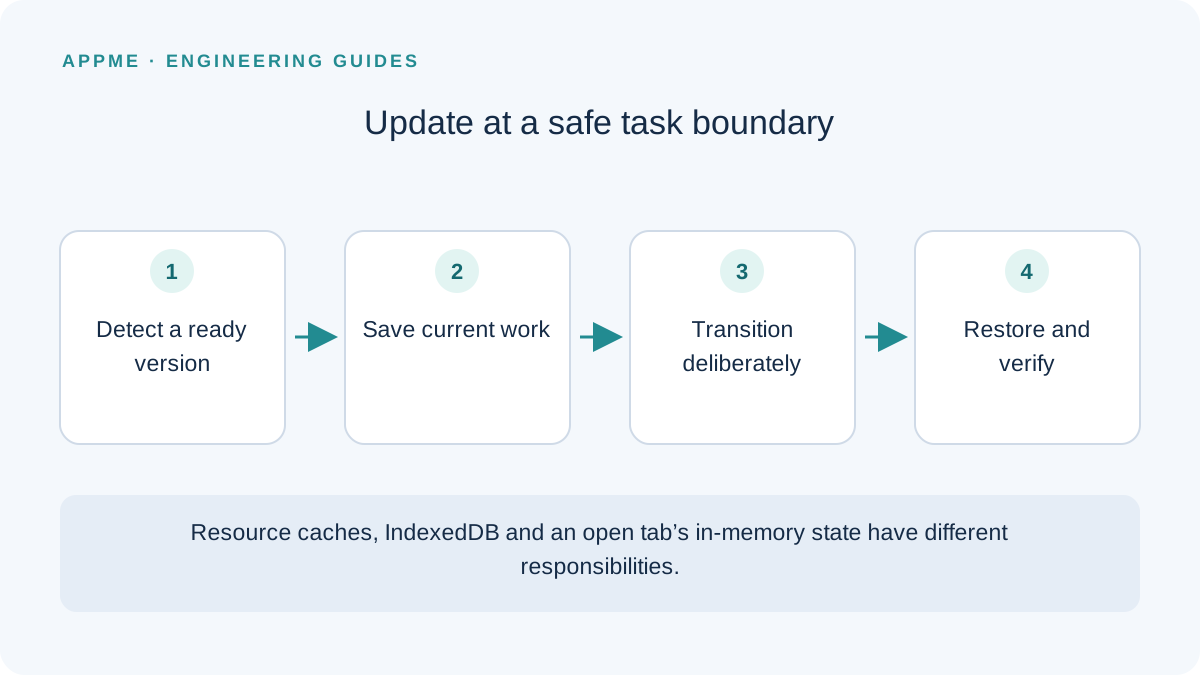
A read-only page has different constraints from an editor. For a draft, persist the necessary state and verify that saving succeeded before changing versions. For an active upload, wait for an appropriate boundary or design a continuation path after reopening.
The following pseudocode describes a product contract, not a service worker script to paste into production:
notice that a new version is ready
inspect unsaved work and active tasks
offer an update at an appropriate moment
when the person accepts:
    persist recovery state
    request activation using the app's protocol
    transition versions deliberately
    restore the draft and verify its state
Messaging, reload behavior and multiple-tab coordination depend on the framework and cache design. A useful update notice explains whether current work has been saved instead of asking for a blind refresh.
Also define the defer path. Someone postponing an update should understand whether they can finish the current task and when they will be prompted again. Do not repeatedly interrupt typing whenever a worker event fires.
Clean caches by ownership and compatibility
Use an application-specific namespace so cleanup does not accidentally remove another feature's cache on the same origin. Determine when an earlier resource generation is no longer needed; an old-looking name alone is not sufficient evidence.
Hashed bundles and HTML have different lifetimes. Removing earlier bundles immediately during deployment can break a tab that requests an older lazy-loaded chunk. Your rollout needs a resource-retention and compatibility decision alongside the worker change.
Keep database migration separate from resource deletion. A new page may understand a new draft schema while an old open page does not. Plan for that overlap rather than assuming the worker switch upgrades all application state atomically.
Exercise the difficult update journeys
Open two version-A tabs, create a draft and deploy B. Test both immediate acceptance and postponement. Interrupt the connection during the transition, simulate a failed local save, and close a tab before its latest changes are persisted.
Acceptance should include recovery of promised saved content, no repeated submission and no mixed-resource failure screen. Record the versions and the state before and after the transition. A successful new installation does not test any of those upgrade paths.
Include these scenarios in the release-readiness checklist. If your app stores structured local records, the SQLite migration guide illustrates how to think about data invariants separately.
Frequently asked questions
Does skipWaiting ensure everyone immediately uses the new app?
No. It changes part of the worker lifecycle. Open pages, multiple tabs, data compatibility and resource availability still need deliberate handling.
Should each deployment register a differently named worker URL?
Do not change the registration URL simply to avoid understanding updates. Establish the intended scope and lifecycle for your framework, then verify the result on a production-equivalent build.
Primary sources
Check these original references again before making a release or policy decision.