

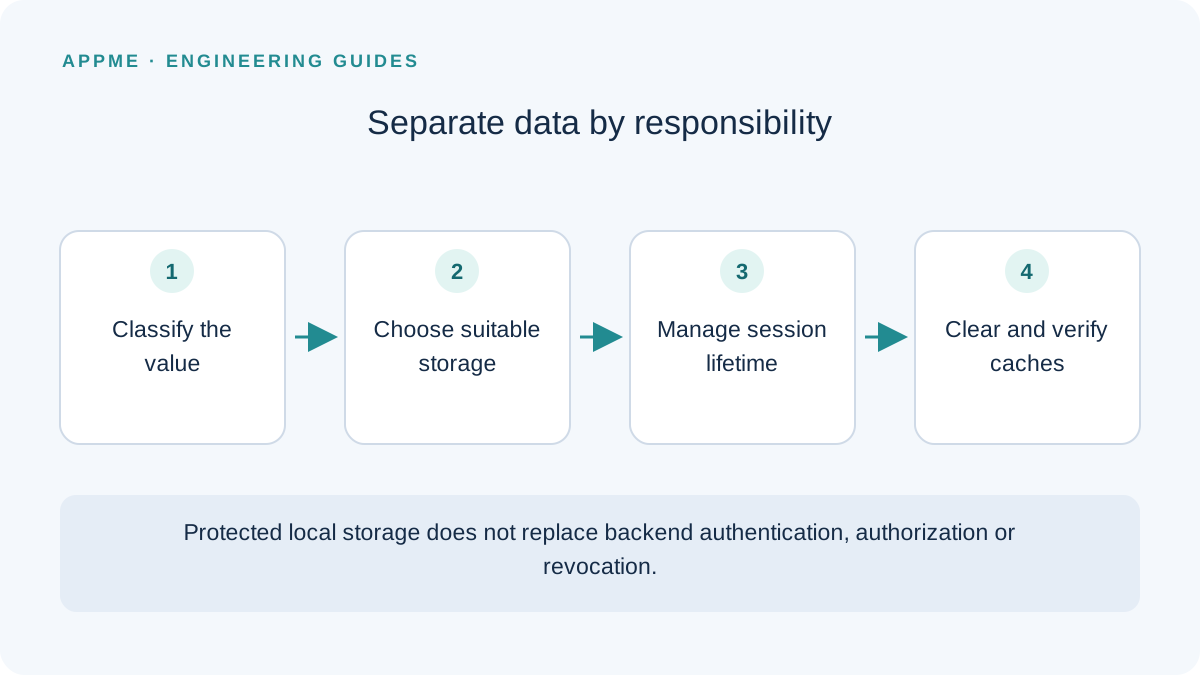
An Expo application often stores preferences, cached content, drafts and authentication tokens on the same device. Putting everything into one key-value store simplifies the first implementation but makes session cleanup and data-handling responsibilities difficult to control.
Classify data before choosing storage. AsyncStorage is for ordinary persistent state; Expo SecureStore provides protected local key-value storage for suitable secrets. Neither library replaces the authentication and authorization rules of your backend.
Make a storage decision for each category
Expo describes SecureStore as a way to encrypt and store local key-value pairs. AsyncStorage's official documentation describes an unencrypted persistent store. That distinction matters for credentials, but it does not mean every application record belongs in a secret store.
Imagine a language-learning app with a theme preference, a selected language, a writing draft and a refresh token. Establish each value's lifetime, deletion behavior and recovery path before implementing a shared save function.
| Value | Storage to evaluate | Question to resolve |
|---|---|---|
| Theme and layout choices | AsyncStorage or another settings store | Does the value contain credentials? |
| Public content cache | Cache or application database | How is its size limited and content removed? |
| A small refresh token | SecureStore within the authentication design | What happens on read failure, expiry or revocation? |
| A sensitive draft | Storage designed for its data classification | How do access, backup and deletion work? |
Keep storage behind a session boundary
Avoid letting every screen independently read a token, refresh it and handle expiration. A small session layer makes ownership clearer and gives the application one place to decide when fresh sign-in is required.
import * as SecureStore from 'expo-secure-store';

const SESSION_KEY = 'session.refresh-token';

export async function readRefreshToken() {
  return SecureStore.getItemAsync(SESSION_KEY);
}

export async function saveRefreshToken(token: string) {
  await SecureStore.setItemAsync(SESSION_KEY, token);
}

export async function clearRefreshToken() {
  await SecureStore.deleteItemAsync(SESSION_KEY);
}
This example is only a storage adapter. Its caller must handle rejected promises, a missing token, overlapping refresh requests and server-side revocation. Do not include the token in a console message or exception report while handling those failures.
Also distinguish a temporary network problem from a rejected credential. A failed connection to the refresh endpoint does not by itself establish that the stored credential is invalid. Your API contract should define the response that requires a new sign-in.
Treat logout as a sequence of responsibilities
After clearing local credentials, stop using the old session, clear account-specific cached data and enter a signed-out state. If the backend supports session revocation, connect that capability to the product's logout policy.
A subtle failure occurs when an earlier request completes after logout and writes the previous account's data back into the cache. Use an appropriate cancellation or session-identity boundary so results from an earlier session cannot populate the next account's interface.
For the learning example, test logout while a progress refresh is delayed. Sign in as another test account before releasing the old response. The second account should never see the first account's progress, even briefly. This is a proposed regression scenario rather than a claim about a particular released product.
Test reinstall, restoration and authentication options
Expo documents platform differences in persistence, backup handling and authentication-related options. Do not assume a value always survives uninstall or that every platform removes it in the same way. Test the exact configuration and distribution build you use.
If requireAuthentication is enabled, include cancellation and relevant biometric changes in the test plan. Provide a valid route back to sign-in when a local secret is no longer readable. SecureStore should not be the only recoverable copy of irreplaceable business records.
Keep payloads appropriately small and handle native storage errors. A protected key-value entry is not a substitute for a database with explicit retention and record-management behavior.
Release checklist
- Credentials do not appear in AsyncStorage, URLs, logs or analytics properties.
- A failed storage read does not leave an endless loading screen.
- Simultaneous expired requests do not trigger uncontrolled refresh attempts.
- Logging out and changing accounts does not restore the previous account's cache.
- Fresh installation, upgrade and relevant restoration paths have been exercised.
Review your analytics data inventory, especially tools that automatically attach request context. For account lifecycle planning, see the passkey recovery guide.
Frequently asked questions
Can SecureStore safely hide a backend API secret distributed with the app?
Do not distribute a backend-only secret to clients. Protected local storage does not turn software delivered to an end user into a server-side secret environment.
Should I store a complete user profile as one secret JSON string?
Classify the fields and check platform constraints first. Store only what is necessary for a defined purpose; a small-secret store does not replace a structured application database.
Primary sources
Check these original references again before making a release or policy decision.